CGPA Calculator

Category: Student Guides

  • YCMOU Science CGPA to Percentage: The 2026 Formula Explained

    YCMOU Science CGPA to Percentage: The 2026 Formula Explained

    For the grading system documented in YCMOU’s School of Sciences Prospectus 2026, converting a CGPA involves both multiplication and a deduction. This guide explains the sequence and how to check that the rule fits your programme.
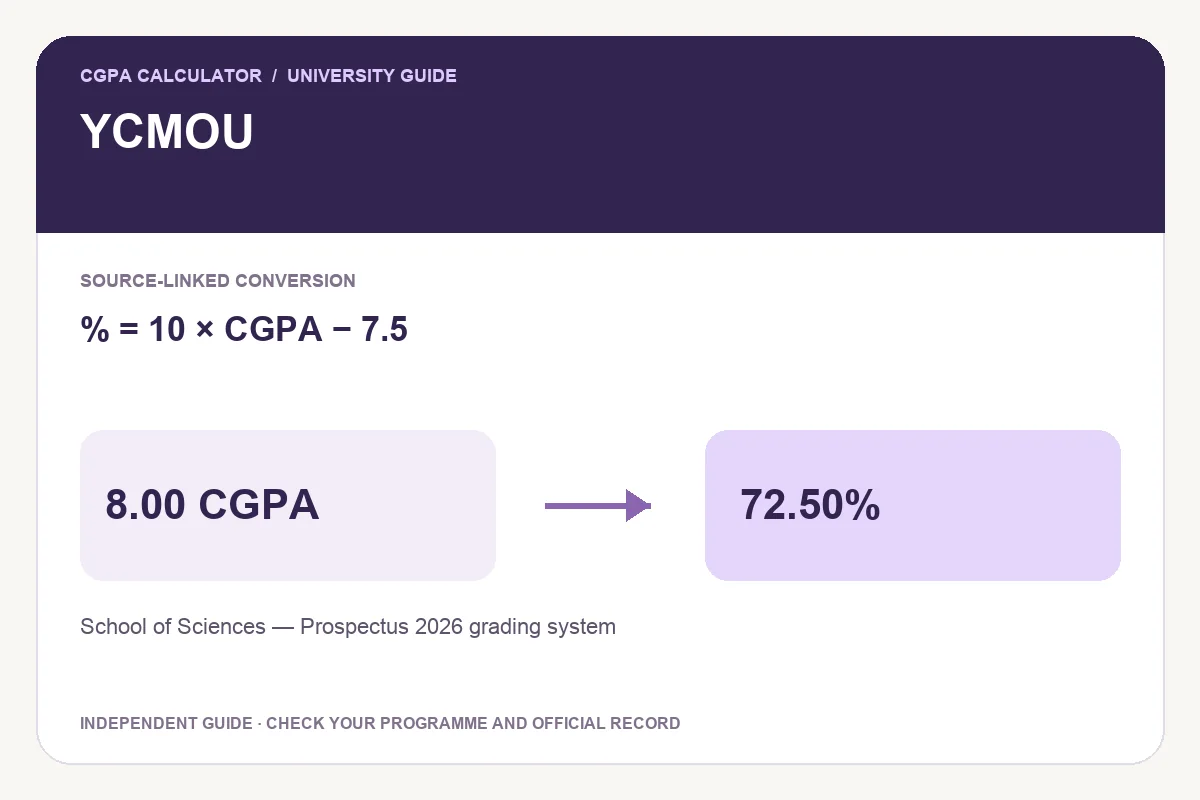
    YCMOU conversion guide showing % = 10 × CGPA − 7.5 and an illustrative 8.00 CGPA to 72.50% calculation.
    Illustration of the School of Sciences — Prospectus 2026 grading system method. Other programme or regulation options may use a different rule.

    The formula printed in the 2026 prospectus

    Page 27, item 8, of the official School of Sciences Prospectus 2026 states percentage equivalence = 10 × CGPA − 7.5. This is the method used by the linked calculator.

    The verified scope is the grading system documented in that prospectus. Do not assume that every historical YCMOU programme, qualification or assessment pattern uses the same instruction. Check your programme’s applicable prospectus or examination guidance.

    Percentage equivalence = (10 × CGPA) − 7.5

    Open the YCMOU School of Sciences percentage calculator

    Worked example: 8.00 CGPA becomes 72.50%

    First multiply 8.00 by 10 to obtain 80.00. Then subtract 7.5 percentage points: 80.00 − 7.50 = 72.50%. Parentheses help show the order clearly. Subtracting before multiplying would produce a different, incorrect calculation.

    Worked calculation summary
    CGPA Calculation Percentage equivalence
    6.00 60.00 − 7.50 52.50%
    7.00 70.00 − 7.50 62.50%
    8.00 80.00 − 7.50 72.50%
    9.00 90.00 − 7.50 82.50%

    How to check your input and calculate

    • Identify the school, programme and academic pattern on your record.
    • Review page 27 of the linked 2026 School of Sciences prospectus.
    • Select that prospectus’s grading-system preset in the calculator.
    • Enter the final ten-point CGPA and review the resulting percentage and source before exporting.

    Common mistakes when converting YCMOU grades

    A marks-to-grade table groups performance into bands. A table by itself does not prove that an exact percentage can be recovered from a grade-point average. Use an explicit applicable conversion instruction rather than guessing a multiplier from the endpoints of a band.

    Another common mistake is using one semester’s SGPA where a form requests the cumulative result. Read the field label and keep the original academic record available. A grade-point summary and a completed degree’s final record may cover different courses.

    Keep the converted percentage attached to its programme scope. If an official record or later applicable instruction gives a different method, resolve the difference with the university before using an estimate on an application.

    Save, print or share a calculation

    After entering a valid grade-point value, choose Download PDF for a portable report, Print report for a paper copy, or Download image for a PNG. Keep the programme label, formula and source with the result so that the calculation can be understood later.

    Share opens a preview with the tool link selected by default. Select Include current result only when you want to include the entered value and calculation details. Review the preview before copying it or choosing a sharing app. A report generated by this website is an independent calculation, not a university certificate.

    Frequently asked questions

    Does YCMOU always use CGPA × 10?

    The cited 2026 School of Sciences prospectus instead states 10 × CGPA − 7.5. This guide verifies that scope and does not assert a university-wide rule for all historical programmes.

    Is 8.00 CGPA 80% in this preset?

    No. Under the documented rule, the deduction gives 72.50%. The calculator displays the selected formula with the result.

    Try the programme-specific calculator

    Open the full university calculator and usage guide, or use the same tool below.

    Official source checked

    Reviewed on October 23, 2026.

    Worked examples use simplified calculation models. Check your institution’s current regulations, grading scale, rounding rules and official records before relying on a result.
  • How to Convert IIT Delhi CGPA to a Notional Percentage

    How to Convert IIT Delhi CGPA to a Notional Percentage

    IIT Delhi students looking for a percentage should distinguish a notional numerical equivalent from actual marks. This guide explains the published rule and shows how to record a calculation with its source.

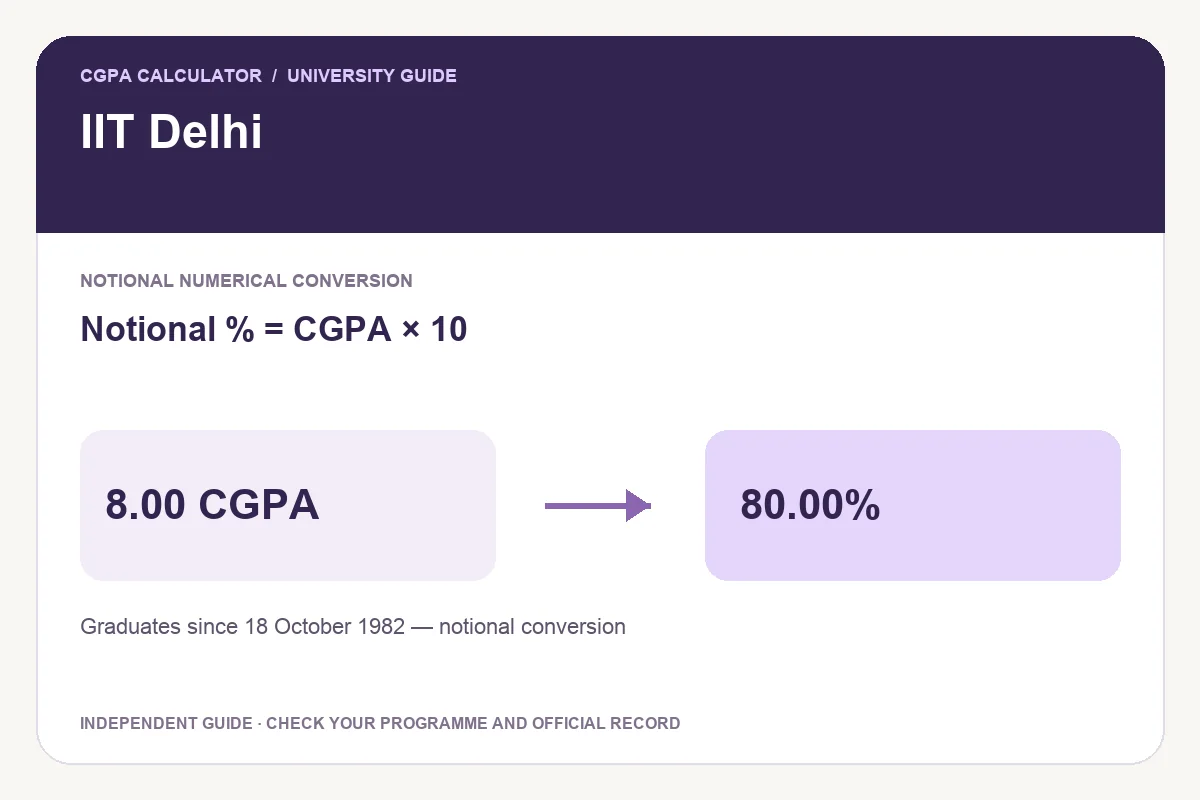
    IIT Delhi conversion guide showing Notional % = CGPA × 10 and an illustrative 8.00 CGPA to 80.00% calculation.
    Illustration of the Graduates since 18 October 1982 — notional conversion method. Other programme or regulation options may use a different rule.

    What the IIT Delhi certificate confirms

    The institute’s certificate dated 24 July 2017 permits CGPA × 10 as a notional percentage for graduates since 18 October 1982. The result should retain that notional label; it is not a reconstruction of individual course marks.

    The certificate is hosted on IIT Delhi’s academic website. Check the linked document and your academic record before using the preset. The graduation scope in that certificate should not be confused with rules used to assess applicants who studied at another institution.

    Notional percentage = CGPA × 10

    Open the IIT Delhi CGPA to percentage calculator

    Worked example: 8.20 CGPA

    Enter 8.20 as the final ten-point CGPA. Multiplying by 10 gives a notional 82.00%. Keep the original CGPA alongside the converted number when a form or reviewer requests both.

    Worked calculation summary
    Final CGPA Calculation Notional percentage
    6.00 6.00 × 10 60.00%
    7.50 7.50 × 10 75.00%
    8.20 8.20 × 10 82.00%
    9.00 9.00 × 10 90.00%

    Use the calculator step by step

    • Check that the academic record is an IIT Delhi graduate record on the ten-point scale.
    • Open the linked calculator and select the graduates-since-18-October-1982 rule.
    • Enter the final cumulative value exactly as shown on the record.
    • Read the result labelled Notional numerical percentage and review the linked certificate.

    Avoid these reporting mistakes

    A semester GPA describes a different study period from a final cumulative GPA. Choose the value requested by the receiving organisation rather than selecting whichever number produces a higher percentage.

    Keep available decimal precision until the final display. If a form requires a whole number, follow that form’s rounding instructions. This website displays two decimal places and cannot determine whether a particular recruiter or institution will accept a notional conversion.

    Use the official downloadable certificate as evidence when required. A calculator report helps explain the arithmetic but does not carry the institute’s certification.

    Save, print or share a calculation

    After entering a valid grade-point value, choose Download PDF for a portable report, Print report for a paper copy, or Download image for a PNG. Keep the programme label, formula and source with the result so that the calculation can be understood later.

    Share opens a preview with the tool link selected by default. Select Include current result only when you want to include the entered value and calculation details. Review the preview before copying it or choosing a sharing app. A report generated by this website is an independent calculation, not a university certificate.

    Frequently asked questions

    Is 8.00 IIT Delhi CGPA equal to 80%?

    Under the cited certificate, it is notionally 80.00%. Keep the original 8.00 CGPA and the notional label when reporting the conversion.

    Can I use another university’s multiplier?

    Use the rule applicable to the institution that issued your record. A matching scale maximum does not establish an identical conversion policy.

    Try the programme-specific calculator

    Open the full university calculator and usage guide, or use the same tool below.

    Official source checked

    Reviewed on October 23, 2026.

    Worked examples use simplified calculation models. Check your institution’s current regulations, grading scale, rounding rules and official records before relying on a result.

  • Galgotias M.Ed. CGPA to Percentage: A Worked Guide

    Galgotias M.Ed. CGPA to Percentage: A Worked Guide

    The Galgotias M.Ed. handbook describes an approximate relationship between CGPA and percentage. This guide helps you check the scheme, follow a worked example and use the programme-specific calculator.

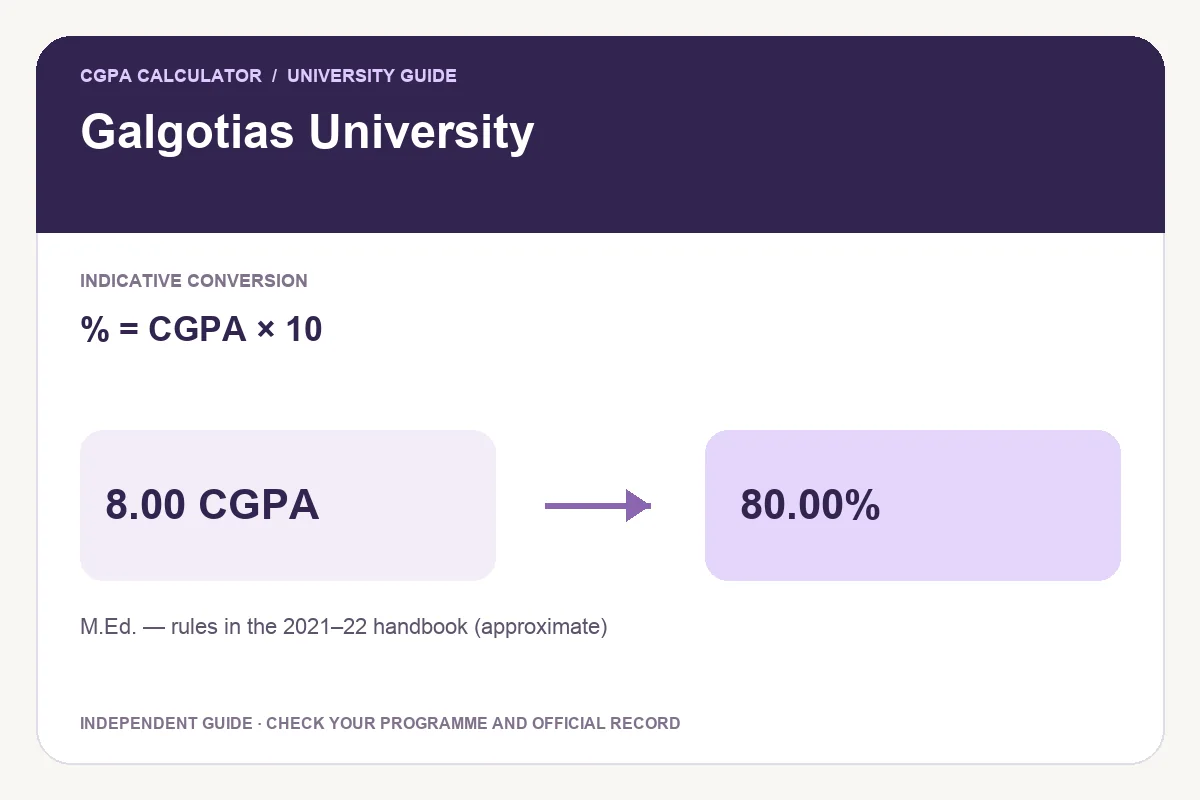
    Galgotias University conversion guide showing % = CGPA × 10 and an illustrative 8.00 CGPA to 80.00% calculation.
    Illustration of the M.Ed. — rules in the 2021–22 handbook (approximate) method. Other programme or regulation options may use a different rule.

    Check the M.Ed. scheme before converting

    The university-hosted 2021–22 M.Ed. handbook includes the 2021–2023 scheme and rules headed curriculum effective from 2019–20. Its “Marks in Percentage” paragraph describes multiplication by 10 as an approximate equivalence.

    This guide applies to that documented M.Ed. scheme. It does not establish a conversion for all Galgotias degrees, including B.Tech., MBA or later regulations. Match the handbook to your own academic record first.

    Approximate percentage = CGPA × 10

    Use the Galgotias M.Ed. percentage calculator

    Worked example: the handbook’s 7.91 CGPA

    The handbook illustrates 7.91 × 10 = 79.10%. The calculation is straightforward, but the result remains approximate. A precise display with two decimal places does not make a grade-based conversion an exact total-marks percentage.

    Worked calculation summary
    CGPA Calculation Approximate percentage
    6.00 6.00 × 10 60.00%
    7.00 7.00 × 10 70.00%
    7.91 7.91 × 10 79.10%
    8.50 8.50 × 10 85.00%

    How to use the M.Ed. preset

    • Locate the degree name, academic scheme and final cumulative grade-point average on your record.
    • Review the linked handbook, especially Section 2, printed page 15 (PDF page 24).
    • Select the M.Ed. rule and enter the ten-point final CGPA.
    • Read the Indicative equivalent percentage label before exporting the calculation.

    Why approximate percentage and actual marks can differ

    A grade-point average summarises grades and course weights. An actual marks percentage requires the marks and maximum marks that the applicable assessment rules include. Those inputs answer different questions, so do not substitute one calculation for the other without checking what the application requests.

    If the official statement already supplies a percentage, keep that value with the original record. When a receiving organisation asks for certified conversion evidence, obtain the appropriate document from the university rather than presenting an independent website report as certification.

    For planning, keep the original CGPA as the main reference. A target expressed in grade points is easier to track across semesters than a percentage borrowed from an unrelated programme.

    Save, print or share a calculation

    After entering a valid grade-point value, choose Download PDF for a portable report, Print report for a paper copy, or Download image for a PNG. Keep the programme label, formula and source with the result so that the calculation can be understood later.

    Share opens a preview with the tool link selected by default. Select Include current result only when you want to include the entered value and calculation details. Review the preview before copying it or choosing a sharing app. A report generated by this website is an independent calculation, not a university certificate.

    Frequently asked questions

    Does this rule apply to every Galgotias course?

    No. The verified preset is scoped to the M.Ed. rules in the cited handbook. A different programme or later scheme needs its own applicable instruction.

    Why does the calculator say indicative?

    The handbook describes the conversion as approximate. The label preserves that distinction in the displayed result and exported report.

    Try the programme-specific calculator

    Open the full university calculator and usage guide, or use the same tool below.

    Official source checked

    Reviewed on October 23, 2026.

    Worked examples use simplified calculation models. Check your institution’s current regulations, grading scale, rounding rules and official records before relying on a result.

  • SGPA vs CGPA: Differences, Formulas and a Worked Example

    SGPA vs CGPA: Differences, Formulas and a Worked Example

    SGPA normally summarizes one semester, while CGPA combines eligible courses across multiple semesters. The key to combining results correctly is the number of credits behind each average.

    Indigo calculator beside stacked course cards, credit tokens and a notebook.
    Grades and course credits work together in a credit-weighted CGPA calculation.

    The difference between SGPA and CGPA

    A semester grade point average, or SGPA, describes performance during one academic term. A cumulative grade point average, or CGPA, describes performance across a larger set of completed courses. A student can have a strong recent semester without immediately seeing a large change in cumulative results, because earlier credits still contribute to the total.

    GPA is a general term for a grade point average. Some institutions use GPA where others use SGPA, or apply different course inclusion rules. Check the labels and calculation method on your own transcript. The examples here use a 10-point, credit-weighted model and do not establish a university policy.

    How course credits affect the average

    Each included course contributes grade points multiplied by its credits. A four-credit course earning 9 points contributes 36 weighted points. A two-credit course earning the same grade contributes 18. The grade is the same, but the larger course has twice the influence on the combined result.

    Semester GPA = total (course grade points × course credits) ÷ total course credits.

    Calculate your semester GPA and cumulative CGPA with individual subject grades and credits. The calculator also lets you edit the points assigned to each listed letter grade.

    Worked example: two semesters with different credit loads

    Consider a student whose first semester GPA is 8.00 over 20 credits and whose second semester GPA is 9.00 over 30 credits. The first semester contributes 160 weighted points and the second contributes 270. Together they contribute 430 points over 50 credits.

    Worked calculation summary
    SemesterGPACreditsWeighted points
    Semester 18.0020160
    Semester 29.0030270
    Combined8.6050430

    CGPA = (8.00 × 20 + 9.00 × 30) ÷ (20 + 30) = 8.60.

    A simple average of 8.00 and 9.00 gives 8.50. That answer ignores the extra credits in the second semester. A simple semester average is appropriate only when the eligible credit loads are equal and the institution allows that method.

    Three mistakes to check before calculating

    • Using subject counts instead of credits. Five courses can carry different total credits from another set of five.
    • Entering previous credits that do not match the previous CGPA. The earlier average and its credit total must describe the same included courses.
    • Rounding every intermediate calculation. Keep the available precision until the final result, subject to the institution’s own rounding rules.

    What about failed courses, retakes and non-credit subjects?

    These cases depend on academic regulations. Some institutions include a failed attempt, some replace an earlier grade after an eligible retake, and some exclude specified non-credit courses. A calculator cannot infer those rules from a letter grade alone. Decide which courses and credits belong in the calculation before entering them.

    Do not convert a GPA from one scale to another by assuming the maximum values are the only difference. Grade boundaries and institutional equivalence rules may also differ.

    Keep a semester record and plan the next step

    A useful record includes each semester’s name, GPA and eligible credits. Keep the original transcript or grade sheet as well, because a summary alone does not preserve individual course details.

    Use the semester GPA tracker to save individual semester summaries in this browser and see their combined credit-weighted result. Export important records before clearing browser data.

    Questions students often ask

    Can SGPA and CGPA be equal?

    Yes. They are equal after a first included semester, or when the new semester average equals the existing cumulative average under the same weighting.

    Will one high SGPA immediately transform my CGPA?

    The effect depends on how many credits the new semester adds relative to the completed credits. A large earlier credit total makes the cumulative average less responsive.

    Which number should I enter on an application?

    Use the metric requested by the application and follow the institution’s official reporting instructions. SGPA and CGPA are not interchangeable.

    Turn the result into a realistic goal

    Once the cumulative calculation is correct, choose the credits over which you want to improve it. A target is easier to assess when it specifies both the desired CGPA and the future credit load.

    Find the upcoming GPA needed for a target CGPA rather than guessing how much one semester can change your average.

    Try the cgpa calculator

    Enter your own values below, or open the full cgpa calculator page for its complete usage guide.

    Worked examples use simplified calculation models. Check your institution’s current regulations, grading scale, rounding rules and official records before relying on a result.

  • How to Improve Your CGPA: Plan With Credits, Not Guesswork

    How to Improve Your CGPA: Plan With Credits, Not Guesswork

    To plan a higher CGPA, start with your current average and completed credits, then calculate the average needed over your remaining credits. A useful goal has both a target and a time horizon.

    Lavender steps rise toward an indigo target beside an open study notebook.
    A target CGPA plan connects your current results with the average needed over upcoming credits.

    Start with the correct baseline

    Record your current CGPA and the eligible credits included in it. These two values must refer to the same courses. An average from your latest semester paired with the total credits from your entire programme will produce an incorrect plan.

    Next, list the credits you expect to complete during the period you want to plan. That can be one semester or several. Use confirmed course credits where possible, and update the plan when registration changes.

    Check your current credit-weighted CGPA if you need to reconstruct it from semester or subject results.

    Calculate the future average your target requires

    This formula keeps the earlier grade points fixed and solves for the average needed over the upcoming credits. It assumes a consistent grading scale and that all entered credits count toward the final cumulative result.

    Required future GPA = [target CGPA × (completed credits + future credits) − current CGPA × completed credits] ÷ future credits.

    Use the target CGPA planner to calculate the required average and compare different credit horizons.

    Example: moving from 8.00 to 8.50 CGPA

    Suppose your current CGPA is 8.00 over 60 credits. To reach 8.50 after another 20 credits, the future GPA must be [8.50 × 80 − 8.00 × 60] ÷ 20 = 10.00. That is mathematically possible on a 10-point scale, but it leaves no margin for a lower result.

    Planning over 40 future credits changes the requirement to [8.50 × 100 − 8.00 × 60] ÷ 40 = 9.25. If the goal is 9.00 after only 20 future credits, the requirement becomes 12.00, which is not possible on this scale.

    Worked calculation summary
    Target CGPAFuture creditsRequired future GPA
    8.502010.00
    8.50409.25
    9.002012.00 — above the scale

    Use the result to set course goals

    Translate the future average into a set of possible course results using actual course credits. A high-credit course has more influence on the semester average, so understanding its assessments is useful. This does not mean ignoring lower-credit courses or any course that has a separate passing requirement.

    For each course, note the assessment weights, upcoming deadlines and the areas where you can still improve. Use practice work and feedback to choose specific study tasks. A calculator can clarify the arithmetic; it cannot predict learning outcomes or guarantee grades.

    Check exam requirements before choosing an overall target

    An overall course target and a final examination target are different numbers. If you already have internal assessment results, use the official weights to find the final marks needed. Also check whether the final examination has a separate minimum passing score.

    Calculate the final exam marks needed for your course target using internal percentages and the examination maximum.

    Recalculate after real changes

    • After a semester result, replace projections with the actual GPA and completed credits.
    • If course registration changes, update the upcoming credits instead of keeping the old planning horizon.
    • If a grade is corrected or a retake changes an earlier attempt, apply the institution’s official replacement rule before recalculating.
    • Keep enough numerical precision and aim above a rounded minimum when practical.

    Questions about CGPA improvement

    Can I raise my CGPA in one semester?

    Often the average can rise, but the amount depends on the existing credits, new credits and grades earned. Calculate the requirement before assuming a particular increase is achievable.

    What should I do if the required GPA is above 10?

    Use a longer planning horizon or choose a lower intermediate target. The model cannot reach an average above the scale maximum over the entered credits.

    Does this planner account for retakes automatically?

    No. A retake may replace or coexist with an earlier result depending on the institution. Update the baseline according to that policy first.

    Choose a plan you can review

    A practical plan records the baseline, target, upcoming credits and a review point. Save or print the calculation so you can compare the original assumptions with the next result. Treat it as a planning aid rather than an official academic decision.

    Try the target cgpa planner

    Enter your own values below, or open the full target cgpa planner page for its complete usage guide.

    Worked examples use simplified calculation models. Check your institution’s current regulations, grading scale, rounding rules and official records before relying on a result.

  • 75% Attendance: How Many Classes Do You Need to Attend?

    75% Attendance: How Many Classes Do You Need to Attend?

    The classes needed to reach 75% depend on both your current attended count and the number of classes held. Future classes increase the total held, so the answer is not simply 75% of today’s total minus the classes attended.

    Desk calendar with checked lavender squares beside a clock and pencil.
    Track classes held and attended before calculating your attendance percentage.

    Check whether 75% is actually your requirement

    This article uses 75% as a worked example. Your course, university or examination board may set a different threshold or apply separate rules for practical sessions, lectures or approved absences. Use the applicable official requirement before making an attendance plan.

    Count only the sessions included under that rule. A whole class count is appropriate for equally weighted sessions; a policy based on teaching hours or differently weighted sessions may need a different calculation.

    Open the attendance calculator and enter your actual requirement rather than assuming it is always 75%.

    Calculate the current attendance percentage

    If 40 classes have been held and you attended 28, the percentage is 28 ÷ 40 × 100 = 70%. That is the starting point, not the number of future classes needed. When you attend another class, both the attended count and the held count increase by one.

    Before any classes have been held, the percentage is undefined because the denominator is zero. It should not be treated as a measured 0% attendance record.

    Attendance percentage = classes attended ÷ classes held × 100.

    Worked example: recovering from 70% to 75%

    Start with 28 attended out of 40 held. After attending eight consecutive future classes, the counts become 36 attended out of 48 held. The new percentage is exactly 75%. Attending only seven would give 35 ÷ 47, or about 74.47%, which is still below the threshold.

    Worked calculation summary
    Consecutive classes attended nextNew countsAttendance
    028 / 4070.00%
    735 / 4774.47%
    836 / 4875.00%

    Classes to attend = ceiling[(0.75 × held − attended) ÷ 0.25], when currently below 75%.

    How many classes can you miss while staying at 75%?

    If you attended 36 of 40 classes, you are currently at 90%. Missing eight future classes would leave you at 36 ÷ 48 = 75%. Missing a ninth would produce 36 ÷ 49, about 73.47%, so eight is the maximum under this model.

    A permitted absence in the calculation is not permission from your institution. Attendance can also be only one part of a course’s requirements. Allow some margin for timetable changes, late record corrections and other applicable rules.

    Classes you can miss = floor(attended ÷ 0.75 − held), when currently at or above 75%.

    Why rounded percentages can mislead

    A displayed percentage is often rounded to two decimals. Near a threshold, rely on the underlying counts and the official policy rather than the rounded display alone. The attendance calculator uses the counts to determine whole-class recommendations.

    Recalculate after every attended or missed session. A plan that assumes consecutive attendance stops being accurate when the next class is missed.

    Common attendance questions

    Does the calculation include classes that have not happened yet?

    The recovery result models the future classes you attend consecutively. The starting counts should include only sessions already held.

    Can I recover exactly 100% after missing a class?

    Not while that missed class remains in the denominator. Check whether an official exclusion or exemption applies; do not assume one.

    Can the calculator decide if I am eligible for exams?

    No. It estimates a percentage under the entered counts. Only the institution’s applicable rules and official records determine eligibility.

    Plan attendance and exam preparation separately

    Meeting an attendance requirement does not establish that a particular exam mark will be enough to pass. Keep the attendance plan separate from the marks needed for your course result.

    Work out the final marks needed for your target result after checking the assessment weights and any separate component pass requirements.

    Try the attendance calculator

    Enter your own values below, or open the full attendance calculator page for its complete usage guide.

    Worked examples use simplified calculation models. Check your institution’s current regulations, grading scale, rounding rules and official records before relying on a result.

  • How to Calculate the Final Exam Marks You Need

    How to Calculate the Final Exam Marks You Need

    To find the final exam marks you need, first calculate how much your internal assessment already contributes to the overall result. The remaining contribution must come from the final exam, according to its weight.

    Exam answer sheet with an indigo pencil, calculator and hourglass.
    Use your internal score and assessment weights to plan the final exam marks you need.

    Collect four inputs before calculating

    • Your internal assessment score as a percentage.
    • The percentage of the overall result assigned to internal assessment.
    • The overall course percentage you want to reach.
    • The maximum raw marks available in the final exam.

    Use the weighting published for your course. A final exam marked out of 70 can still be worth 60% of the overall result. Raw maximum marks and assessment weight are separate quantities.

    Use the exam marks calculator once you have these four inputs.

    Convert raw internal marks into a percentage

    If you earned 24 out of 30 internal marks, the internal percentage is 24 ÷ 30 × 100 = 80%. Entering 24 in a field asking for a percentage would substantially understate the internal score.

    If internal assessment contains several components, first combine them according to their official weights. A simple average is suitable only when those component weights are equal.

    Apply the weighted score formula

    The final exam weight is the part remaining after the internal weight. This two-component model assumes there are no extra independently weighted components left out of the calculation.

    Required final exam percentage = [target overall percentage − internal percentage × internal weight ÷ 100] ÷ (1 − internal weight ÷ 100). Required raw exam marks = required final percentage × exam maximum ÷ 100.

    Worked example: an 80% internal score and a 75% target

    Assume internal assessment is worth 40% of the course and the final exam is worth 60%. An 80% internal score contributes 32 percentage points to the overall result. To reach 75%, the final exam must contribute another 43 percentage points.

    The required final percentage is 43 ÷ 0.60 = 71.666…%. For a 100-mark exam, that is at least 71.67 marks when displayed to two decimals. For a 70-mark exam, the raw requirement is 50.166… marks.

    Worked calculation summary
    Final exam maximumCalculated requirementIf only whole marks are awarded
    10071.67 displayedAt least 72
    7050.17 displayedAt least 51

    Round upward to the next permitted scoring increment rather than down. Your institution may use a specific rounding or moderation policy for the official result.

    Recognize impossible and already-secured targets

    If the requirement exceeds the exam maximum, the overall target cannot be reached using the entered internal result and weighting. Recheck the data, then choose another target if the inputs are correct.

    If the calculation is zero or negative, internal assessment alone already supplies the contribution needed for that overall target. This does not mean the final exam can be skipped. A separate final-exam pass mark, compulsory attendance or another course rule can still apply.

    Connect the course goal to your semester plan

    An overall course percentage does not translate into grade points without the course’s grade boundaries. After checking those boundaries, you can model possible course grades and their credit-weighted contribution to your semester result.

    Check the semester GPA needed for your target CGPA to see how a course-level goal fits within the larger academic plan.

    Questions about required exam marks

    Should the internal weight be 40 or 0.40?

    Enter 40 in a field labeled as a percentage. The formula converts it to a decimal internally.

    Does a 75% overall target guarantee a pass?

    No. Separate component minimums and institutional rules may apply. Use the official course requirements alongside the calculation.

    What if internal assessment is worth 100%?

    There is no remaining final-exam component to solve for. This final exam model requires an internal weight below 100%.

    Keep the other course requirements visible

    A useful exam plan records the target, the remaining assessments and the dates on which the inputs may change. Keep your attendance record current as well.

    Check your attendance percentage and recovery plan separately from the marks calculation.

    Try the exam marks calculator

    Enter your own values below, or open the full exam marks calculator page for its complete usage guide.

    Worked examples use simplified calculation models. Check your institution’s current regulations, grading scale, rounding rules and official records before relying on a result.

  • CGPA to Percentage: How to Choose the Correct Formula

    CGPA to Percentage: How to Choose the Correct Formula

    A CGPA does not have one universally correct percentage equivalent. The conversion must come from the official rule that applies to your institution, programme and academic period.

    A lavender arrow connects a grade chart card to a card with a percent symbol.
    Convert grade points using the multiplier and offset in your institution’s official formula.

    Why a single conversion rule is not enough

    A grade point average summarizes grade points assigned to courses. It does not necessarily preserve the original percentage marks. Grade boundaries, grade point scales and institutional equivalence methods can differ, so multiplying every CGPA by the same number is not a reliable universal method.

    A convenient online formula is only useful when it matches the policy that applies to your record. If an application requests an official percentage equivalence or conversion certificate, check its instructions before supplying a calculated number.

    Find the applicable official conversion method

    • Check the conversion note on your transcript or marksheet.
    • Look for your institution’s academic regulations or official conversion certificate instructions.
    • Confirm the programme, grading scale and academic period covered by the policy.
    • If the document is unclear, ask the institution’s designated academic office rather than assuming a formula.

    Keep the source document with the calculation. This article does not assign a formula to a named university or claim that a particular multiplier applies to your record.

    Use a multiplier and offset for linear formulas

    If the official rule is simply CGPA × 9.5, the multiplier is 9.5 and the offset is zero. If it is CGPA × 10 − 5, the multiplier is 10 and the offset is −5. These are illustrative formulas, not universal policies.

    Percentage = CGPA × multiplier + offset.

    Enter your official formula in the CGPA-to-percentage calculator using the multiplier and offset fields.

    Worked example: the same CGPA, different formulas

    For an 8.00 CGPA, an illustrative multiplier of 9.5 with no offset produces 76.00%. A multiplier of 10 with an offset of −5 produces 75.00%. The arithmetic is straightforward in both cases; choosing the applicable policy is the essential step.

    Worked calculation summary
    Illustrative ruleCalculation for 8.00 CGPAResult
    CGPA × 9.58.00 × 9.576.00%
    CGPA × 10 − 58.00 × 10 − 575.00%

    If a linear rule is written as (CGPA − a) × b, expand it to CGPA × b − a × b. The multiplier is b and the offset is −a × b. Follow a lookup table or conditional policy directly when it cannot be represented by one linear rule.

    Check the CGPA before converting it

    Even the correct conversion formula produces a misleading answer if the CGPA is wrong. Confirm that the average includes the right credits, course attempts and grading scale. Avoid replacing a cumulative average with the latest semester GPA.

    Recalculate a credit-weighted CGPA from your grades if you need to check the input before converting it.

    Avoid false precision and unsupported scales

    Use the official rounding instructions when reporting a result. Extra decimal places do not make a calculation more authoritative than its inputs. Keep enough precision during the calculation, then apply the required reporting rule.

    The site’s converter accepts CGPA from 0 to 10 and a linear formula. It does not directly convert a 4-point GPA, use programme-specific lookup tables or issue an official equivalence certificate. Results outside 0–100% are flagged so the inputs can be checked.

    Questions about conversion

    Is CGPA × 9.5 always correct?

    No. Use it only when the applicable official policy specifies that rule. It is an editable illustration in the calculator.

    Can I use a negative offset?

    Yes. An official formula that subtracts a constant uses a negative offset. Enter −5 for a formula ending in minus 5.

    Is the downloaded report an official certificate?

    No. It records the arithmetic and inputs. An official conversion document must come from the appropriate authorized institution or body.

    Keep the input and policy together

    Save the CGPA used, the exact formula, the resulting percentage and the source of the policy. A separate semester record can help you check which results contributed to the original average.

    Keep a local semester GPA history and export important records before clearing browser data or switching devices.

    Try the cgpa to percentage

    Enter your own values below, or open the full cgpa to percentage page for its complete usage guide.

    Worked examples use simplified calculation models. Check your institution’s current regulations, grading scale, rounding rules and official records before relying on a result.